

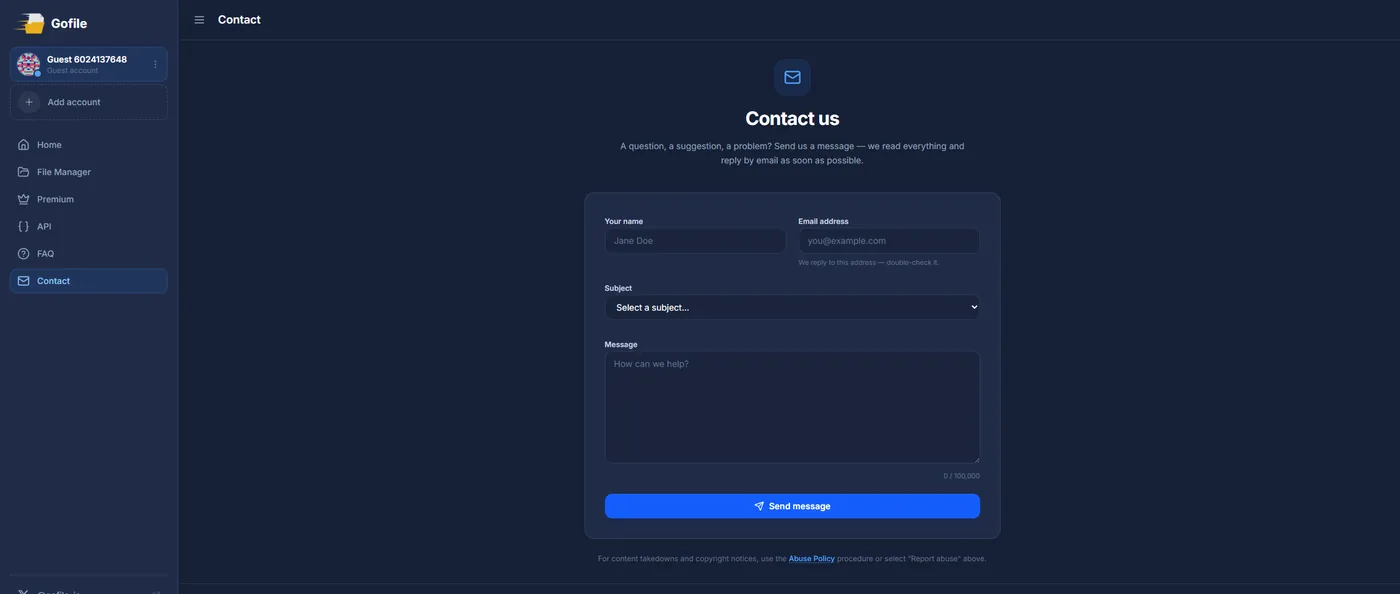
Gofile acts on abuse reports and it acts quickly. Report the offending file or folder through its contact form at gofile.io/contact, pick the "Report Abuse" subject, paste the exact Gofile links, and add a link to your original profile as proof. The catch is not whether Gofile removes it. It is that Gofile links expire and the same file often gets re-uploaded under a new link, so you re-report as they come back.
Here is the part worth hearing first: Gofile is a cooperative host. It is not one of those anonymous sites that buries its contact and ignores you. It runs a simple abuse report, it reads it, and it disables links that infringe your copyright, usually without any drama.
The real work with Gofile is not the first report. It is that the platform is built around short-lived, easily re-created links. A file you kill today can be re-uploaded to a fresh link tomorrow. This guide covers both: how to file the report that works, and how to stay ahead of the re-uploads.
If you would rather not watch for new links yourself, our OnlyFans leak removal service monitors Gofile for reappearances and files each report for you.
Gofile
Contact
gofile.io/contact (Report Abuse)
Response
Usually fast
Difficulty
Does Gofile actually remove content?
Yes. Gofile disables files and folders that infringe copyright when you report them through its contact form. Because it is the host, taking the file down removes the content itself, not just a link to it. Any forum or thread pointing at that file goes dead the moment the file does.
So the question is not whether Gofile will act. It is whether your report has the exact links it needs, and whether you keep reporting as the same file reappears under new links.
What to put in the Gofile report
Open the contact form at gofile.io/contact and fill it out cleanly. A vague report about "my leaked content" is easy to set aside. A precise one is easy to action.
Collect the exact links
Copy the full Gofile file and folder URLs where your content sits, one per line. A general mention is not enough. They need the specific links to disable them.
Open the contact form
Go to gofile.io/contact and choose the Report Abuse subject so it reaches the right team.
Describe the infringement
State that you are the copyright owner, that the content is used without permission, and paste your link list. Add a link to your original profile (OnlyFans, Fansly, MYM) as proof of ownership.
Add your name and a working email
Give your full legal name, an email you actually check, today's date, and your name again as a signature. Keep a copy of what you sent.
Note
You do not have to give a file host your home address. A valid name and email are what gets a link disabled. If a field asks for a mailing address, use a management or agent address, never your personal one.
The part most guides skip
Filing once rarely ends it. Gofile links are designed to be short-lived and cheap to recreate, so the same file often reappears under a new link within days, and the leak usually sits on several other hosts at the same time. Clearing one link is real progress, but it is not the finish line.
Two habits keep it down:
- Re-report the moment a new link shows up, not once a month.
- Send the Gofile links to Google as well, so they drop out of search even if a copy is re-uploaded elsewhere. Our guide to removing content from Google walks through that.
Tip
Screenshot each Gofile page before you report it. Once the link is disabled you may still need proof it existed, for a repeat offender or a follow up.
Filing it yourself or letting us handle it
Gofile links keep coming back. Stay ahead of them.
SuppressLeak watches Gofile for re-uploads, files each report, and delists you from Google.
FAQ
Does Gofile respond to abuse reports?
Yes. Report through the contact form at gofile.io/contact with the Report Abuse subject and it disables infringing links, usually fast.
How do I report content on Gofile?
There is no dedicated email. Everything goes through the contact form at gofile.io/contact. Include the exact file and folder links plus proof you own the content.
Why does the same file keep reappearing?
Gofile links are short-lived and easy to recreate, so the same content gets re-uploaded to new links. You re-report as they appear, and delist them from Google.
Do I need a registered copyright to report?
No. You own the copyright the moment you create the content, so you can report without registering anything.
Free DMCA Takedown Notice Template
A complete, reusable notice you can adapt for any host.
Read moreRemove Content from Google
Get the links out of search even when a copy is re-uploaded.
Read moreRemove Leaked Content from LeakGallery
The same approach for a cooperative leak gallery.
Read moreOnlyFans Leak Removal Service
Let us monitor Gofile and file the reports for you.
Read more


